Search Product Amazon

Asus Transformer Pad Infinity TF700 to hit the US in July, will sell at $499 and up


After a very exciting 2011, the high-end Android tablet market niche had a pretty uneventful (so as not to say boring) first half of 2012. There have only been a couple of interesting unveilings these past six months, and, until recently, we can’t say we saw any exciting 10-inchers hit the market.
However, we knew that we were only dealing with the calm before the storm and now, finally, the storm is unleashed! Acer’s Iconia Tab A700 has just started shipping in the US, Google and Samsung are prepping the launches of the Nexus 7 and Galaxy Note 10.1, and now the Asus Transformer Pad Infinity TF700 has a US release date.
The Asus Transformer Pad Infinity will start selling across the States on July 16, according to official sources cited by Engadget, and the tablet’s pricing looks fair by all means. The 32 GB version will go for $499, while the 64 GB model will be made available for $599.

It’s true, Google’s Nexus 7 tablet will come at half of those prices, but remember we’re dealing here with probably the best 10-incher to ever hit the Android world. At least that’s how the Infinity looks on paper, with a beautiful 1900 x 1200 Super IPS+ LCD touchscreen, a 1.6 GHz quad-core Tegra 3 processor, 1 GB of RAM, Android 4.0 Ice Cream Sandwich, and a 25 Wh battery.
 
Asus promised a 4G LTE-enabled version of the Infinity as well (powered by a dual-core Qualcomm Snapdragon S4 processor, of course), but we don’t know when to expect that particular tablet to hit the US or the rest of the world.
Getting back to the Wi-Fi-only models expected to be made available in just three weeks (and counting), you should know that the Transfomer Pad Infinity will come with a optional dock which will probably be sold at around $149. However, the good news is that, if you’re the proud owner of an older Transformer TF201 tablet with a keyboard dock, you’ll be able to use the same dock for the new tablet.
The Transformer Pad TF700 will come with a couple of other “treats” as well, including a pretty great 8 MP rear-facing camera with f/2.2 aperture, autofocus and LED flash, a 2-megapixel front-facing webcam, Bluetooth 3.0, a microSD card slot, HDMI, USB 2.0 and 8 GB of free lifetime cloud storage.
Don’t trust Engadget’s sources and need further confirmation that the Transformer Pad Infinity is coming really soon in the United States? Here’s a Best Buy online listing for the 64 GB Infinity! The 10-incher does appear as “sold out” for the time being, but this is yet another strong piece of evidence that the 10-incher will, in fact, start shipping in just a matter of weeks.
What say you, Android tablet lovers out there? Will you be going for the Asus Transformer Pad Infinity, the Acer Iconia Tab A700, Google’s Nexus 7, or Samsung’s Galaxy Note 10.1?

 

Apple’s MacBook Pro & iMac Running on Intel Ivy Bridge Processor

We have already heard about the rumors that Apple would be using Intel’s chips for its next generation MacBook Pro and iMac since 2011. I thought such rumors would be confirmed late this year but as early as today, GeekBench confirmed through a benchmark entry that Apple is almost ready to launch it’s new computers. The said Canadian website has a history of revealing correct information about the specs and benchmark scores of several products prior to the official announcement of the manufacturers. So, we have a good reason to believe that the scores (dated May 10 and May 13, 2012) showed from GeekBench’s database are from the real Apple machines.
iMac Running on Intel Ivy Bridge
Apple’s decision to use Intel Ivy Bridge chips was motivated by the fact that there will be around 10% to 15% boost in overall performance and that seems to be the case here. The information posted by GeekBench on its website dated May 10, 2012 shows 12,183 benchmark score for the new iMac13,2 running on Intel Core i7-3770 clocked at 3.40GHz. The score is way better than the current iMacs which only have 11,500 benchmark scores. I believe the iMac13,2 shown on the website was the 27-inch model running on the powerful quad-core processor.
The Intel Core i7-3770 sports 4 cores and each of them runs 2 threads at the same time. Thus, it is apparent this CPU could run 8 threads at the same time making it very useful for processes that require hyper-threading like extensive video and photo editing. In the same information sheet, it was shown that iMac13,2 will be sporting 4GB of RAM while operating on Mac OS X 10.8 (Build 12A2040). So, basically we are looking at a very powerful machine from Apple which would become the fiercest rival of any Windows desktop computers.
Another benchmark result was shown on GeekBench’s website dated May 13, 2012. This time it’s the MacBookPro9,1 which is still running on Intel’s Ivy Bridge chip and achieved 12,252 score which is way higher than the scores of the current MacBooks. MacBookPro9,1 is running on Intel Core i7-3820QM clocked at 2.70 GHz. While the clockspeed is lower than that of the chip used in iMac13,2 it has doubled the RAM (8GB) so it has achieved a higher score than the previous.
This is going to be very difficult to beat by any Windows laptop available in the market or the ones that are about to be released. Considering the reputation of Apple when it comes to building high-quality computers and really cool operating system, we can expect that these products would soon dominate both the desktop and laptop markets. Apparently, the use of Intel’s chipsets brought very impressive results to the already powerful brands and products. For the past two years we’ve seen how dual-core computers battled over dominance in the market, this year we will be seeing how quad-cores clash while trying to put their competitors down. But the thing is, Apple has never lost a fight with Windows and the latter won’t admit being underdog, so we can expect a heated competition this year.
 

Facebook App Center Goes Live: Free & Paid Apps

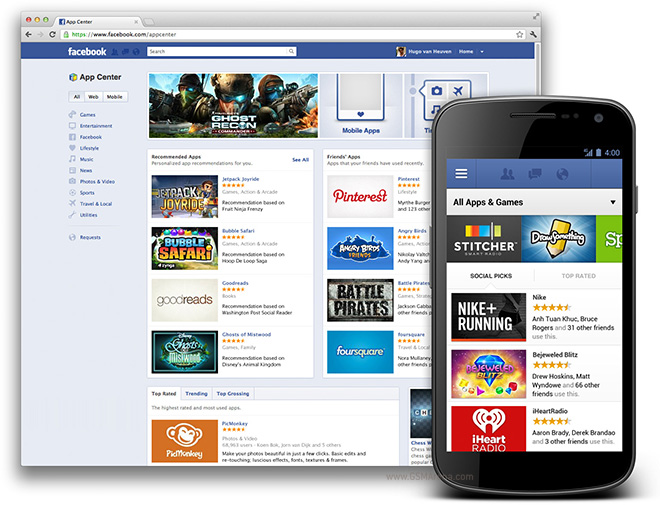
The most popular social networking site Facebook launches its app center today. This is after all the reports that Mark Zuckerberg’s company is planning to house all Facebook apps–both paid and free–in one place to make it easier for users to find, choose and eventually install the ones they like best. Facebook App Center, which is put in a different directory under the main domain (facebook.com/appcenter), will be Facebook’s another campaign strategy to boost revenue from advertisers as well as help app developers have a proper platform for their ingenuity.
Facebook App Center
If it sounds familiar to you, it is because we have already reported about Facebook App Center last month in which we said that it should be launched in May, we were wrong. Today it has gone live but still available for the web version of Facebook. However, the company already assured us that it will be brought to both iOS and Android mobile platforms to maximize its reach. And considering the fact that more and more people are resorting to browse the web and interact with their friends through smart phones, Facebook couldn’t waste the chance of doubling its reach.
Just like the typical Facebook functionality, users would be able to see what apps their friends have installed or games played. In other words, Facebook does not want to lose the essence of social interaction and behavior even when it comes to offering applications for users. However, while our basic tendency is to think that Facebook is posing as a competition to both Apple App Store and Google Play Store, that’s not the case. Facebook will not be competing these giant app centers from Apple and Google, instead it serves as a referrer for both.
For example, if you choose Instagram on Facebook App Center and click on the “Send to Mobile” button, you will be able to receive a notification on your Android or iOS device. Tapping on the notification will launch the mobile application and you will be brought to either Google Play Store or Apple App Store depending on the device you’re using. In case you already have Instagram on your smart phone, tapping on the notification will simply launch the app but not redirect you to the any app stores.
In the case of the Facebook web apps and games, you will be able to access them the way you did before. I would like to reiterate that this development concerns Facebook as a whole but not the apps developed by third parties. Thus, there will never be a change in any interface of the apps you’ve been using. Also, you will be able to access paid apps now that the app center is live; you couldn’t just do this before.
As much as I don’t want to share it, but the current number of apps found in the Facebook App Center amounts to just 600 and nothing more. This is because it is newly-launched and that migration hasn’t been done by other developers yet. Existing Facebook users need not to worry because everything will be just the same, the only difference is that there is now a place for developers to showcase their apps for free.
 

iPhone app – 4Eyes Review – Features, Ease of Use

The app called 4eyes, updated on 16th August 2011, and created by Andrew Davis is an efficient app which makes searching easier and faster. There are plenty of search engines out there but it requires a lot of time to find exactly what you need. Most engines do not even process shorthand words and thus, a lot of time is wasted. Since we are short on the patience, we require an app like 4eyes which helps us search with our own desired speed. The app requires iOS 3.2.2 or later.
4Eyes iPhone App
4Eyes iPhone App

Features:

The app has a simple grey theme which is both stylish and sleek yet easy to use and soothing to the eyes. The homepage has a keypad at the bottom, a search bar at the very top and a screen of sorts in the middle which displays the results of your search. The app has over 30 services for your searches. The greatest feature in this app is the fact that you can write in short hand and the app will comprehend what you mean. If you need to search for a weather update, all you require is to type in the letter W and the location for which you require the update. The app will comprehend your command and provide you with exactly what you need. Search commands can also be saved for future use. This saves time further as you only require one click to search for what you require. In the bottom right hand corner, you will find a button with a heart on it which should be clicked to save your search.
4Eyes iPhone App
4Eyes iPhone App
The app also lets you to share the results of your search results through the usual social networking websites. The app does not cover voice commands yet and only works with a keypad. The app has originally been tested on iOS 4.0 and runs smoothly. However, the app can work on iOS 3.2.2 and over as well.
4Eyes iPhone App
4Eyes iPhone App

Ease of Use:

The app has large icons and a very simple and easy interface. The app comes with a guide as well titled ‘How to’. This feature guides you through the working of the app step by step. A tab at the top helps you quicken your search by choosing whether what you’re looking for is an image, a piece of news, a place or more. This makes it very easy to search exactly what you desire in a short amount of time.

Verdict:

The app currently costs $1.99 and works pretty well. It is a shame that it does not have voice command and the developers should take note and try adding it. Otherwise the app comes in pretty handy.
 

iPhone App – Daily Routine Review – Features, Ease of Use

Is there a need to organize your life? Not only does organizing your life lead to more productivity but it also clears some time for you to relax and unwind. Daily Routine, an app by Jayson Marais, helps you set a routine for your everyday life. The Daily Routine app, released on the 13th of August 2011, allows an incredible amount of customization and has a colorful and hip interface to keep you hooked. This app lets you set your task, the time allotted to each, and even lets you customize the routine according to whether it’s the weekend or the weekday. The app currently costs you $2.99.
iPhone App - Daily Routine

Features:

Multiple tasks make up one routine for each day. You can choose tasks or create them yourself. They can be general, like sleep or work etc, or more specific, like attend meeting or visit parents. You are required to set a times lot for each activity. There are even notifications which show once the time for a certain activity starts and ends.
The app shows numbers from 1 to 11 on a bar on the left side which acts like a clock. Colorful ribbons with details of your tasks are connected to these time slots. There are five buttons at the base. The first one shows your list of routines. Routines can be saved and copied to other days as well. The second button is for activities and it allows you to add, subtract and edit your tasks. In the center is the notifications button and you can choose to turn it off or on, according to preference. The fourth button takes you to a calendar on which you can set routines according to days and weeks. The last button, labeled ‘more’, allows you to customize the app to your liking, like changing the icons etc.
The routines can be emailed and printed as easily.
iPhone App - Daily Routine

Ease of use:

The Daily Routine app is not as user-friendly as one would expect it to be. The interface is colorful and creative but rather difficult to use. The many options available in the app are convenient but also confusing. Setting a routine itself becomes a hefty task to be accomplished.

Verdict:

The app is a little expensive at $2.99 since it does not even offer any syncing options. If something happens to the app or the phone, the routines you have so carefully designed will be lost. The app does crash sometimes but hopefully that problem can be solved by the developers. Overall, the app looks really good and can prove useful for people looking to organize their life.
 

iPhone App – EPL Addicts – Review, Features, Ease of Use

EPL addicts, updated on 15th August 2011, is one of the many apps created by Football Addicts. It helps you stay abreast with the latest in the Barcley Premier League. Barcley Premiere League is arguably the most famous and esteemed soccer league in the world. It has many fans and followers not only in Europe but also around the world. Once the season kicks off, it is hard to follow all the important matches and your favorite teams standing. EPL Addicts makes this process easy for you by providing you with all the updates in a single place.
EPL Addicts for iPhone

Features:

The app lets you follow multiple teams of your choice. The app shows the icons of all league teams. Clicking on them lets you follow updates related to those teams only. The information includes their previous and up-coming matches, team line-ups. The app also has extensive forums where one can participate in discussions related to their teams and different matches. There are multiple useful tabs in the app. The tab called Top Stories includes the latest news related the entire league in general. Another tab displays the league table and results from different matches. The live tab helps you stay updated with matches which are going on at that time. The links to all the tabs are available at the base of the homepage, which makes it convenient to navigate through the website.
The app also allows you set different notifications to indicate a new goal scored, or the end or start of a match etc. This is extremely convenient because it ensures that you don’t miss a match or get the score if a new goal is scored. If a match gets interesting after a newly scored goal, you can always tune in to watch the rest of the match.
EPL Addicts for iPhone

Ease of use:

The interface is extremely catchy with a red theme. The graphics are really good and the app is pretty easy to use. Even though the interface is user-friendly, the design is really special and creative. The team lineup is indicated by a bird’s eye view of an animated football field with figures of players indicating position and the final team line-up.

Verdict:

The EPL Addicts is a free app which is a very useful app for all soccer lovers. It has all the features that one can possibly demand and has a really creative interface which keeps users hooked. Its many features, like notifications on goals and detailed pre and post-match info, ensure that it is a wholesome app which is all any soccer lovers need when the Barcley Premier League begins.
 

iPhone App – Rivet-Build Your Focus Review – Features, Ease of Use

The Rivet-Build your focus app, released on the 10th of August 2011, is a very unique and helpful app. When you are bombarded with a barrage of distracting apps which you fool around with all day and compromise your productivity, Rivet can help you get back into focus. This clever app trains you to focus on your work rather than get easily distracted and leave it unfinished. In an age of the internet where there is much that can distract you, apps like Rivet are a must have for all.
Rivet-Build Your Focus - iPhone App

Features:

This $1.99 app has a very simple homepage with a theme consisting of shades of blue and brown to sooth your senses. The homepage gives you three options to choose from. The first option can be used if you need to focus on something for a specific amount of time. The second option is to focus while songs play and the last option lets you choose from a host of routines that you’ve saved from before.
If you choose to focus for a specific amount of time, you can set a timer. Once that time is up, the app rings a buzzer to indicate that you can take a break now. This helps you set little goals for yourself. You can increase the time slowly to train yourself. To focus with music, you are required to create a playlist with sings from your library. You can listen to your playlist while you work.
Rivet-Build Your Focus - iPhone App
The bottom end of the app has two buttons; Report and Settings. Reports show you your level of productivity. This way you can compare results from before you started using the app, and afterwards.
Rivet-Build Your Focus - iPhone App

Ease of Use:

Rivet-Build Your Focus - iPhone App
The interface is extremely simple with nothing fancy or too colorful to distract you. The app guides you through the process step by step. If you wish to write everyday for at least 30 minutes without any distractions, just click on your saved routine and the timer will automatically start. Each time your timer is up, the app displays an adorable message which says ‘happy productivity’.
Rivet-Build Your Focus - iPhone App

Verdict:

The Rivet – Build your focus app is an ingenious way of helping people focus on their chores. The increase in internet usage has resulted in people getting distracted too easily by numerous time wasting websites and applications. The Rivet helps you set little goals for yourself. Accomplishing these little goals boosts your morale and helps you focus for a longer time in the future.
 

iPhone App – Photo 365 Review – Features, Ease of Use

Can you imagine having a calendar with thumbnail images to remind you what special activity you did on that particular day? Photo 365 allows you to add pictures to every single day of the year so that you have a lively calendar which at a glance tells you which picture was taken when and indicates your liveliest weeks and months. All you are required to do is take an image from your camera or choose one from your gallery and add it to a certain day on the calendar. You will end up with not just a calendar with dates but one that reminds you how much fun you’ve had.
Photo 365 iPhone App

Features:

The app has a very pretty theme consisting of maroon, brown and grey shades. The app shows you a monthly calendar indicating month, year, date and day. Each date has a box of its own which can be filled by pictures and notes. All you have to do is tap on one date box in the calendar to add a photo or note. The app gives you the option of either taking a picture there and then with your phone’s camera or choosing one from your gallery. The end result is a calendar with thumbnail images on every date.
The app allows you to change the pictures as well and add pictures to past dates. One good feature for forgetful people is that you can set an alarm so the app indicates everyday that you should take a photo and upload it. This feature can prove useful if you are on vacation.
The photos and the filled calendar can be shared on social networking websites as well. The app includes an I button which, besides setting the daily alarm, also gives you the option to write to the developers any issues that you might be facing.
Photo 365 iPhone App

Ease of use:

The app is extremely simple to use with a very beautiful interface. The font is big and easy to understand. The bottom of the screen shows five buttons which allow you to share photos, take photos, move back and forth and add notes to the photo.
Photo 365 iPhone App

Verdict:

The app is a fun way to store photos according to date and you also end up with a lively calendar. The app also has the option of setting an alarm in case you forget to take the image of the day. The app is useful for people who like to be a little creative with everyday things or those who travel a lot and wish to record their journey. The application currently costs $0.99. Overall, Photo 365 is a fun and creative way of documenting your journey in the form of photos on a calendar.
 

iPhone App – GLMPS Review – Features, Ease of Use

The GLMPS app, updated on 09th august 2011, is an app for those who like to experiment with their photography. GLMPS helps you create moving pictures absolutely free. The app records a five minute long video before taking your picture. This adds a little story of its own to the usually still pictures.
GLMPS iPhone App
GLMPS iPhone App

Features:

The app requires you to sign in with social networking websites. Otherwise, you can’t use the app. Once you tap the camera button, the video starts shooting automatically after a little loading. The app helps you upload your five minute videos to twitter, Facebook etc. The app also stores your videos on your GLMPS account. The videos can also be managed under the popular category. The videos are stacked with 24 on one page. A thumbnail of the photo taken shows as the icon for every video. Sharing the videos on social networking websites is relatively easy with share buttons at the base of the app screen.
GLMPS iPhone App
GLMPS iPhone App

Ease of use:

The app only works if you have accounts on social networking websites. Some people do not have these accounts or do not wish to disclose them. This is quite a nuisance since making videos does not necessarily mean you would share them online as well. Any video of a private nature cannot be taken by this app.
The interface is simple enough with the video automatically starting once the app is opened. Navigating through the app is simple. Recorded videos are stored in an organized way and can be played by tapping the thumbnails.
GLMPS iPhone App
GLMPS iPhone App

Verdict:

The GLMPS requires a lot of changes at present if it aims to become a useful app. The requirement for a social networking website is absolutely unnecessary. Usually the option to upload videos of your choice suffices, rather than it becoming a necessity. The quality of the picture at the end of each video is also not too good. The picture essentially is just a still from the video so the quality is seriously compromised. This is not an app one would choose to generally take pictures. Also, the video begins automatically and films a video 5 seconds before the picture is finally taken. The issue with this is that you have no time to prepare for the video and usually the video captures you setting up the camera. It would have been better had the developers added the option of either filming five seconds before or after the picture is actually taken.
The app does not cost anything but the usefulness is limited and a lot of improvements are still required until the app is taken seriously.
 

iPad App – iLearn Animals Review – Features, Ease of Use

This adorable iPad only application allows you to teach your child about animal sounds in a fun and entertaining way. The iLearn app, released on 03rd august 2011, costs you $2.99 but it is well worth the money. The app includes animals’ pictures and sounds and even quizzes to test your child’s learning.
 iLearn Animals iPad App
iLearn Animals iPad App

Features:

The home screen of the app has four buttons; hear, play, look and credits. Tapping the hear button leads you to a page with pictures of 27 animals. Clicking the picture plays the sound of the animal. The sounds have a very good quality and give a feeling of actually being near the animal. Hitting the play button starts a quiz. A big button in the centre labeled ‘listen’ will play a random animal sound with three animal pictures at the bottom of the screen. In order to identify the sound, tap the corresponding picture. The app even makes joyous and sad sounds to indicate whether your answer is correct or not. Tapping the Look button leads to a page full of animal pictures with their names written underneath. Each label shows multiple pictures of the same animal, usually comprising of different breeds and types.
 iLearn Animals iPad App
iLearn Animals iPad App

Ease of Use:

This app is perfect if you wish to teach your toddlers something useful in a fun way. The iPad, however, cannot be handed over to the child. The app has a colorful and extremely simple interface to attract children and to make it easy for them to work the app with relative independence.

Verdict:

The app can be used on an iPad and is not available for iPhone or other devices. The app takes up 38 MB space and the cost is a little higher than other similar apps. The app is extremely useful and a great way to spend some time with your child while working and simultaneously teaching your child something interesting. The app helps the child learn how to use technology and also teaches them basic recognition skills. The app needs to label the animals on every page however. In the current version, labels are only available on the look page. It is essential that the child learns the name of the animal and associates the written name with the picture. The developers should definitely consider this minor change since it could improve the app manifolds.
The app’s extremely adorable look arouses the interests of the child and is a good way to use technology in teaching children lessons in a more pleasing and enjoyable way.
 

The Cocktail App For iPhone Review – Features, Ease of Use

The cocktail culture has been around for some time now and one can confidently say that it has become a permanent part of our social lives. Since the trend of elaborate parties is growing, a skill like cocktail making can come in handy. The cocktail app, released on 01 August 2011, is an artistic and classy way to learn how to make cocktails yourself. The app, designed by Moritz von Volkman, is based on a famous chart by the German designer Konstantin Datz. The app provides instruction on how to prepare cocktails as well as interesting information on their origin. The app provides up to 35 cocktail recipes with ingredients, directions and proportions properly explained. You can now create perfect cocktails at parties for just $1.99.
Cocktail App For iPhone

Features:

The interface is extremely realistic and the detail in the cocktail leaves you craving for a drink. The background and style of the app is classy and posh, which gives a realistic feel of the cocktail parties of the 50s. Each cocktail and ingredient has its own page with interesting information and simple yet detailed instructions on how to create the perfect cocktail. You can even create a list of your favorite drinks so they can be easily accessed later on. The app is available in both English and German.

Ease of use:

The app requires you to be at least 17 years old to be able to download it. That’s about the only thing stopping one from enjoying perfect cocktails at home with the help of the cocktail app. The palette used is soft and soothing to the eyes. Each ingredient and cocktail has a corresponding high resolution image which helps you in identifying it. The instructions are simple and tabs at the bottom of the screen allow easy access and roaming in the app.

Verdict:

The app is a classy, well designed app for people who wish to be self sufficient in the art of cocktail making. The interface is simple and the instructions are easy to follow. The app requires a staggering 20 MB space due to the high quality images and graphics.
The use of this app will be limited. Even though the app provides 35 different recipes for cocktails, one would require a lot of different drinks at home to make them. Not everyone has such elaborate storage of wines and drinks. This app can only prove useful for cocktail enthusiasts.
 

Samsung’s Galaxy S3 TouchWiz Ported To Galaxy Note, Galaxy S2 and… (Gasp) Galaxy Nexus

beb9474fb150x320.jpg Samsung’s Galaxy S3 TouchWiz Ported To Galaxy Note, Galaxy S2 and… (Gasp) Galaxy Nexus
If you currently have in your possession a Samsung Galaxy Note or Samsung Galaxy S2 that just so happens to be rooted, I would like to inform you that you can now add the all-new-and-improved TouchWiz UI from the Samsung Galaxy S3 onto those devices. The launcher reportedly runs great and is an excellent option for those of you looking to add a little pizzazz to your device. While the launcher plays well with TouchWiz’d ROMs, a less stable test version is available for devices running AOSP ROMs like CyanogenMod.
Now for the Galaxy Nexus, users who are looking to give their device less of that Google touch, and more of a Samsung one, have a few options. First, there’s the Galaxy S3 launcher which has also been ported over to run (with a few bugs) on the GNex. Next, is an actual add-on pack that, not only provides the GS3 launcher (with fewer bugs), but throws a few Galaxy S3 stock apps into the mix as well. This will only work on AOSP ROMs like CM9 or AOKP and from what I hear, every time a user flashes this, a single tear rolls down Jean Baptiste Quero’s cheek.
Not sure why anyone would want to defile their Galaxy Nexus with TouchWiz, but I guess that’s the benefit of Android now isn’t it? Options. Still, I’d be careful leaving your house, lest you run into Larry Page or Matias Duarte in a dark alley and they slap that blasphemous Nexus right out of your hand. That being said, anyone try it out yet? Links to the appropriate downloads can be found below.
 

ChatOn is Samsung’s Aplication

Aplication

ChatOn is Samsung’s latest application for Andorid users. But unfortunately, ChatOn still has some problems.
Android users complain about the slow delivery of verification code by Samsung. In the meantime, ChatOn already available in 120 countries in 62 different languages??. This application is similar to the iMessage from Apple and the BlackBerry Messaging (BBM) of the Blackberry.
ChatOn can work with Android, Samsung Bada OS, and some other features of Samsung mobile phones. Samsung has not considered whether to develop a similar application for Windows Phone 7.
Samsung said that ChatOn Android works well with phones that have a pixel resolution of at least 489 of 800, and can run on Android 2.2 (Froyo) or higher.
with this ChatOn you can chat individually or in groups. You can also share photos, videos, and contact and location. The only difference is you can create animated images or providing music as background, and there is also an ‘interaction ratings that can tell you, how often you interact with your friends.
 

Windows 8

Micrsoft Windows – Windows 7 Recently launched on October 22, 2009 yesterday, there were rumors about a continuation of Windows 7, namely Windows 8. According to rumors, Windows 8 will later be launched in 2012.
Details about Windows 8 starts of Robert Morgan, who wrote in a column in a profile on business networking sites. Morgan who holds the position of Senior Research and Development write, if he worked in research and development department with a high security level to medium and long term projects.
In profile, Morgan was working on writing projects and plans to make Windows 8 Windows 9. In the profile is also written “Windows 8 kernel is compatible with 128-bit and Windows 9 in the works”. So that was cited by PC World, Tuesday (13/10/2009).
And as is known, that Windows 7 was released on October 22, 2009 yesterday, the new support 32-bit and 64-bit. To support its own 64-bit, Microsoft used it the first time on Windows XP Professional X64 edition, launched in May 2005.
according to rumors windows 8 will come with many new advantages. some of them are:
  • Ribbon UI
Specifications and features of the first section 8 windows UI Ribbon, Ribbon UI controversy still being debated to this day to be brought into Windows 8 or not. Ribbon (ribbon) itself is a set of toolbar that is placed in the tab bar to display Microsoft Office. Although there are some users who does not agree with the implementation of the ribbon, but there is also the thought that the ribbon is actually much easier for users of Microsoft Office because it is more flexible.
It is also important to recognize that the traditional drop-down menu’s on the more familiar Microsoft Office 2003 so it is easy to digunkan. Well, according to some sources the Ribbon UI is also still be present in Windows 8.
  • Internet Explorer 10
in Internet Explorer 10, Microsoft seems not to rest after the launch of Internet Explorer 9 (IE9). Yes, Windows 8 is rumored to be equipped with the most new-generation browser that is Internet Explorer 10 (IE10). As is known, IE9 is only available for the operating system (OS) like Windows Vista and Windows 7. Likewise with IE10, just a PC or notebook with hardware and software that can sense the most recent experience of using the browser.
  • Windows Store
Store Windows, Microsoft seems to borrow a page from their rivals such as Apple and
Ubuntu by creating an online software market. Well, Windows Store itself will serve as an outlet where the spacer can obtain / purchase applications developed for Windows 8. Reportedly, the Windows Store, Microsoft will improve the quality of the applications offered and reduce the potential for bugs and malware.
  • OS Available On Thumb Drive
section OS Available On Thumb Drive, one of the favorite features that Windows 8 will be taken so far is its ability to store all Windows 8 OS on a bootable USB thumb drive. That way, the spacer can “take” the whole environment of Windows 8 in the USB and boot up if the PC hardware problems.
  • Tablets
Specifications and features of the fifth section 8 windows OS Available On Thumb Drive, the good news that Windows 8 was not only developed for PC and notebook, but also for the Tablet. As we know, so far untapped Tablet by Microsoft. Windows 8 will come in two variants which can also operate for the ARM microprocessor tablets, smartphones and other devices.
  • Features Block
Specifications and features of the windows OS 8 the last section are available in Thumb Drive, Windows 8 is rumored to hold feature blocks / tiles that can be moved around the screen or click straight to log into the application. The block itself will update in real time, so the spacers get to see if there are new incoming email, or any notification from Facebook.
so let prepare your self, Because a new miracle will coming soon
 

App of the day – My Data Manager Free

Welcome to our app of the day section! Today, our app of the day is an Android app called My Data Manager Free. You will be able to use your data connection more wisely, thus saving you money. Mobile data consumption is the key phrase here and My Data Manager Free allows you to take control over it! Let’s analyze the features of this excellent and useful Android app in this quick article.
My Data Manager Free
The data you use over your Wi-Fi, mobile connection and while roaming is monitored by My Data Manager Free. The general details of your mobile plan must be entered for proper notifications and reporting accuracy. These details include, in particular, the following: the date your billing cycle begins, a monthly or a pay-as-you-go type of plan and data allotment (unlimited vs. fixed amount). Depending on how you’ve set your preferences in the app’s menu, a bar chart or pie chart are the ways in which the collected data information can be displayed. Historical usage for previous billing cycles can be easily viewed if you click on a specific item.
For example, a service like streaming media or an app. If you want to avoid overage charges or if you are looking for ways in which your current data service plan can be upgraded / downgraded, this information is very useful. Another useful feature is the “Last 30 Days” button which can be found in the top right of the homescreen. The distribution of data used over your Wi-Fi, mobile and roaming connections over the last month is displayed. Keep in mind the fact that apps2SD is not supported by this app because its basic functionality is disrupted.
All in all, the best Android app that will let you take control over the amount of data your Android device is using points you to the My Data Manager Free app!
 

Google has reached 550K activated Androids per day!

Anyone’s interested in Google’s earnings in the last time period? The U.S. company announced its balance sheet on the second quarter of 2011 and the growth is spectacular if we are also keeping an eye on last year’s figures. The phones and tablets numbers reached 135 million and if the number of daily activations will be maintained, they will exceed the 200 million milestone by the end of the year.
Google Android
Google Android
The Android Market also got a big and crazy boast! The number of applications available in the Android Market has reached 250,000 and the number of software downloads amounted to 4.5 billion. It results a rate of 44-45 applications download from the Market for each Android device. Compared to the competition, this amount is excellent. The good news for Google doesn’t end here though! The second quarter of 2011 was great for Google and not only in terms of its mobile operating system. The revenues had a growth of 32% over the same period in 2010 leading to a total of $ 9.03 billion. It will be interesting to hear what they will say about Google + in the coming weeks. It seems that this time they found a winning recipe as over 10 million profiles were created. Most are male though and the ymust find a way to also make women in Google +.
The future looks very bright for Google and its mobile operating system. 200 million installations are bound to be reached by Google much faster than Apple’s iOS (4 years since the introduction of iOS it took Apple). If this rate is kept, Google will achieve this in three years. An interesting stat is the fact that no less than 400 different Android devices are sold worldwide. So there you have it… Android’s incredible growth!
 

App of the day – Do It (Tomorrow)

Do It app
Do It app
Welcome to another app of the day round-up. Our Android app is called Do It (Tomorrow) and goes by the old saying that you probably are familiar with – why do something today if you can leave it for tomorrow? Well in order to accomplish this, you will need the help of the Do It (Tomorrow) App for Android. Let’s analyze the features of this excellent Android app in this quick article.
Firstly, it has to be said that procrastinators will love this app as it is the perfect app for them. Everyone knows that planning out your entire week can be a rather discouraging and daunting task. The Do It (Tomorrow) app was built with this idea in mind and it works flawlessly. The items you must get done today must be first written down and then things can be pushed off until tomorrow. You have this freedom! So what is the difference between this app and other task/to do apps? The answer is that your calendar is limited to just today and tomorrow. Color-coding tasks, setting reminders or any of the other management options many of us don’t have time to even use can be forgotten  by using this app. Extremely fast task entry is achieved through the clean and easy to use interface. You should be ahppy to find out that there is no bloat whatsoever.
“+ add a new task” must be tapped and then just type away! Your email and a password must be setup in the settings of the app on each device if you want to access to do’s on multiple devices. Free cloud synchronization and backup is enabled as well! All in all, the Do It (Tomorrow) app is a good app that gives you the power to procrastinate with relative ease. The combination of simplicity and streamlined interface certainly recommends itself!
 

App Store downloads are growing by 61%!

Apple’s App Store is on a roll and growing in direct proportion to the market share of their iDevices. Given the fact that there are almost 250 million iDevice’s on the market, it is normal that the number of downloads from the App Store to be constantly growing with him. On the other hand, the average price of an application is also rising. The analysts of the Piper Jaffray firm believe that this year every owner of an iDevice will download an average of 83 applications, 32 more than in 2010.
Apple App Store
Apple App Store
An interesting stat is represented by the prices of the applications as those at Piper Jaffray say that the average price this year will increase by 14% while last year it decreased by 18%. Currently, about 82% of the applications from the App Store are free while only 18% are paid. In addition, the average price of an application is $ 1.44, or about one euro. However, the irony is that the free applications generate more money than the paid applications.
As a result, the developers begin to make the transition to free applications that through in-app purchases can be improved as users have the option to buy new features. Regarding the apps for the iPad, the average price of the first 10 applications, from the top purchased applications, is $ 6.32, 36% higher than last year when the price was around $ 4.66. Another stat says that tablets owners spend more money on applications and this trend will matter very much for Apple in the future.
Americans say that next year the App Store will generate revenue of 7.7 billion, with over 3.4 billion dollars more than this year. If the number of iDevice on the market will increase accordingly then the figures presented by them aren’t impossible.
 

App of the day – NASA Android App

Our app of the day is an excellent Android app that will capture your imagination. With the help of the NASA Android App, our solar system and the entire universe can be explored. Let’s take a closer look and analyze the features of the NASA Android app.
NASA Android App
NASA Android App
Links to images, mission information, videos, tweets, NASA TV and a whole lot more are opened up by the homescreen by the NASA Android App. Details on all of the current and future planned missions are provided by the NASA Missions page. For example, nothing stops you to learn about the International Space Station, the Kepler spacecraft (other Earth-like planets were searched) or the Hubble Space Telescope. Other useful feature is the Image of the Day (IOTD) tab through which unique insights into the world of NASA can be gained! Even they are fairly high resolution, the loading of the images is quick over Wi-Fi. You should be happy to find out that you can scroll through over nearly 1700 images. The majority of them have a supporting caption. By browsing the Astro Pic of the Day (APOD), pictures of stars, galaxies, and other bodies in the night sky can be viewed with relative ease.
Some incredible content is featured the NASA Videos although keep in mind that these videos must be opened using the YouTube Android app or a browser. What is more, a must watch in your browser is also the live NASA TV programming. Of course, for this type of content, the best and preferred solution would be in-app viewing. The NASA TV schedule can also be viewed if you want to find out the air time of a specific TV program.
All in all, if you are a space buff who enjoys exploration, space and NASA, this app is the best choice you can possibly make.
 

The Google+ App! – Google Social Network

People have been going google-crazy over the latest addition to the search engine giant’s cadre called Google+.
It’s a combination of social networking like Facebook but has video conferencing like no one else. You can do all sorts of things that makes great use of the Cloud . It’s got the kind of features you would expect from Google in order to boost their newest creation and it’s a must have for sure.
Google+ is still in it’s start up stage and people are drooling at the mouth to get in on it. That’s why this app is so important and is being downloaded faster than pancakes off the griddle.
Google+
Google+
The instant uploading is like having your own little robot sending your photos and videos to your private album online so you can show them off via sharing. You can stream getting the latest info from your online friends. It’s got a feature called “circles” that allows for better management and getting the latest from your friends.
Yes, you can huddle too.
The speed at which you can send messages will astound you and this app can only get better with time and tweaking.
This is what we call state of the art technology that takes part in the latest Google goodies and that means your communication and promotion of whatever you do is done with a level of expertise that’s like something out of a science fiction movie.
This is the future right here and now and getting in on this app so you can master it now can be the difference between success or failure especially in the growing realm of online business and marketing.
The smart business person who utilizes social networking will see the value of this app right off the bat.
Same with families who need to know who is where and what they’re doing. This is going to make a lot of parents at ease as well as administrators like teachers and principals. Any organization that needs to keep tabs on where their members, friends, and customers are that use social networking had better jump on this app and master it asap.
Google is proving again that they mean business and with this new app it’s a good bet it’s just the tip of the iceberg to what’s to come.
So don’t waste time with this Google+ app. By the time you read this, just about everyone else will be hopping on it.
The Google+ app for Android is free.
 
 
Support : Creating Website | Intel I5 | Blog
Copyright © 2011. Technology and Gadget - Reserved
Created by Creating Website Published by Mas Template
Proudly powered by Premiun Blogger Themes